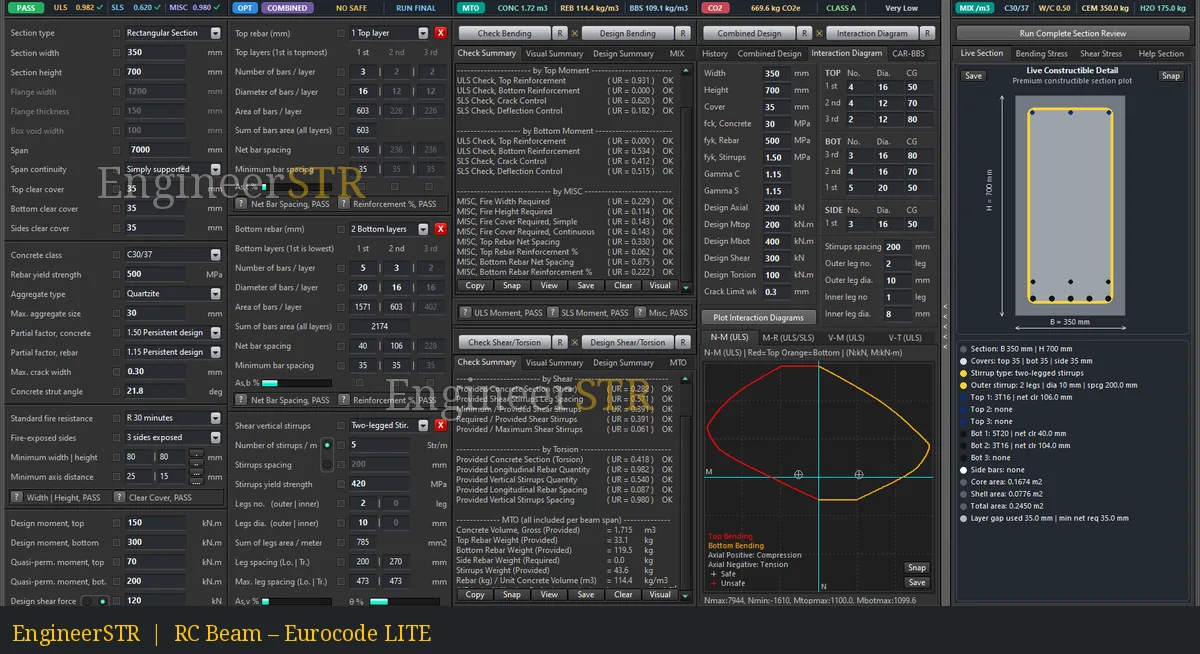
One main workspace
Inputs, tools and summary indicators remain close to the engineering task, with detailed results organised into direct tabs.
Inputs, tools and summary indicators remain close to the engineering task, with detailed results organised into direct tabs.
Spacing and reinforcement indicators identify affected detailing groups. Review the explanation and adjust inputs before relying on results.
N–M (ULS), M–R (ULS/SLS), V–M (ULS) and V–T (ULS) complement the numerical summaries.
Concrete properties, rebar calculations, unit conversion and expression calculation are available on the lower ribbon. The upper ribbon brings together check status, optimization, quantities, BBS, mix and carbon summaries.
Explore every feature groupULS: Ultimate Limit State. SLS: Serviceability Limit State. UR: Utilization Ratio. BBS: Bar Bending Schedule. MTO: Material Take-Off.
Open the glossaryOne workspace · Connected decisions
Follow the beam from input to review. The upper summaries, central design panels and lower utilities keep the core engineering task in view.
Choose a stage to highlight its role. All five explanations remain available below.
Review status without losing context.
Bring ULS, SLS and other check indicators together with design mode, quantities, BBS, mix and carbon summaries. Read individual results before accepting a design.
Explore related featuresKeep the model and its inputs close.
Define the rectangular section, materials, actions, reinforcement and available project factors in the main workspace. User-entered factors allow project-specific National Annex parameters.
Explore related featuresFind what needs attention.
Inspect utilization and individual check results. Yellow messages and explanation buttons draw attention to affected inputs or detailing; review the explanation and revise the relevant input.
Explore related featuresCarry decisions through to documentation.
Compare design alternatives, inspect interaction views, and review detailing, material quantities, schedules and supported exports.
Explore related featuresResolve everyday calculations in reach.
Use concrete properties, rebar calculations, unit conversion and an expression calculator alongside the beam workflow.
Explore related featuresFour complementary views
Explore the four interaction views alongside the application’s numerical results. These descriptions guide product exploration; the plotted limits and variable definitions remain those shown by the application.
Axial force and bending moment viewed together.
Review the relationship between axial force and bending demand in the section response.
Inspect interaction previewsThe application’s M–R view brings an additional perspective to the displayed results.
Use the variable definitions, axes and guidance shown in the application when interpreting this view.
Inspect interaction previewsShear force and bending moment viewed together.
Inspect combined shear and bending in the context of the other resistance checks.
Inspect interaction previewsShear force and torsion viewed together.
Review the combined shear–torsion view alongside stirrup, longitudinal reinforcement and spacing checks.
Inspect interaction previews